Internet and IP Address


Internet: The internet is a worldwide system of connected networks that lets devices communicate and share information using IP addresses and standard protocols.
What is an IP Address?
- IP (Internet Protocol) address is a unique number given to every device connected to the internet.
- It acts like a digital address so data knows where to be delivered.
How IP Address is Allotted?
- When you connect to the internet, your ISP (Internet Service Provider) assigns an IP address to your device.
- When you disconnect, the same IP address can be released and assigned to someone else.
- - This is called a Dynamic IP.
Static vs Dynamic IP:
- Dynamic IP → Changes every time you connect. Most common, provided automatically by ISP.
- Static IP → Fixed address that doesn’t change, usually used by servers, websites, and companies.
Why Do We Need DNS?

- Computers communicate using IP addresses (like 142.250.182.14).
- But remembering these numbers is hard for humans.
- DNS (Domain Name System) works like a phonebook — it maps easy-to-remember domain names (like google.com) to IP addresses.
Flow of Accessing a Website:
- You type a website name in your browser (e.g., youtube.com).
- Browser asks the DNS server for the IP address of that domain.
- DNS server responds with the correct IP address.
- Your device then uses that IP to connect to the web server and load the website.
MAC Address and Port number
- A MAC address is like the serial number of your device’s network card.
- It is unique for every device (like your fingerprint).
- It never changes because it is built into the hardware.
Why it is Needed?
- To identify devices in a local network (like Wi-Fi or LAN).
- To make sure data goes to the right device inside the network.
- Used for network security (like blocking/allowing devices).
MAC address = Your device’s permanent home address
inside the local network.
IP address = The temporary address given when you
connect to the internet.
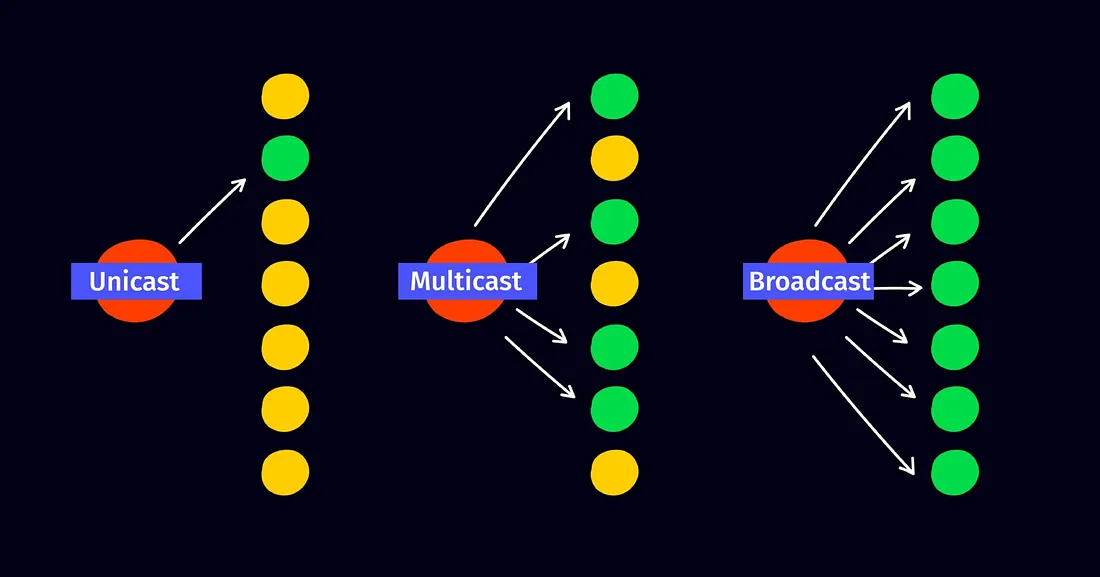
Ways to Send or Receive Data
-
Unicast
- Data is sent from one device to exactly one device.
- Example: Your laptop sending a file directly to your friend’s laptop.
-
Broadcast
- Data is sent from one device to all devices in the local network.
- Example: When a device first joins a network, it sends a broadcast asking “Who is the DHCP server?”
-
Multicast
- Data is sent from one device to a selected group of devices.
- Example: Online video streaming where the same video is delivered to many viewers at once without sending separate copies.
HTTP vs HTTPS

-
HTTP (HyperText Transfer Protocol):
- Transfers data between browser & website in plain text.
- Data can be intercepted by others.
-
HTTPS (HyperText Transfer Protocol Secure):
- Secure version of HTTP using SSL/TLS encryption.
- Keeps sensitive data (passwords, payments) safe from hackers.
Example:
- Login with HTTP → Username & password can be stolen.
- Login with HTTPS → Data is encrypted & secure.
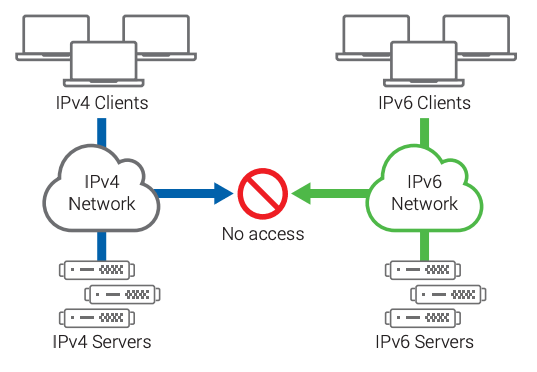
IPv4 vs IPv6
/IPv4-vs-IPv6-EN.png?width=1320&name=IPv4-vs-IPv6-EN.png)
-
IPv4:
- 32-bit, written as dotted decimal (e.g., 192.168.1.1).
- ~4.3 billion addresses.
-
IPv6:
- 128-bit, written in hexadecimal (e.g., 2001:db8::7334).
- Huge address space (340 undecillion).
- Faster routing, built-in security (IPSec).
Why IPv6?
- IPv4 addresses were running out due to internet growth & IoT.
- IPv6 solves shortage and adds better features.
Switch vs Router

Switch
- Connects multiple devices inside a LAN.
- Uses MAC addresses to forward data.
- Works at Data Link Layer (Layer 2).
Router
- Connects different networks (e.g., home to internet).
- Uses IP addresses to send data.
- Works at Network Layer (Layer 3).
In short:
- Switch: Connects devices in same network (MAC).
- Router: Connects networks & internet (IP).
Public vs Private IP
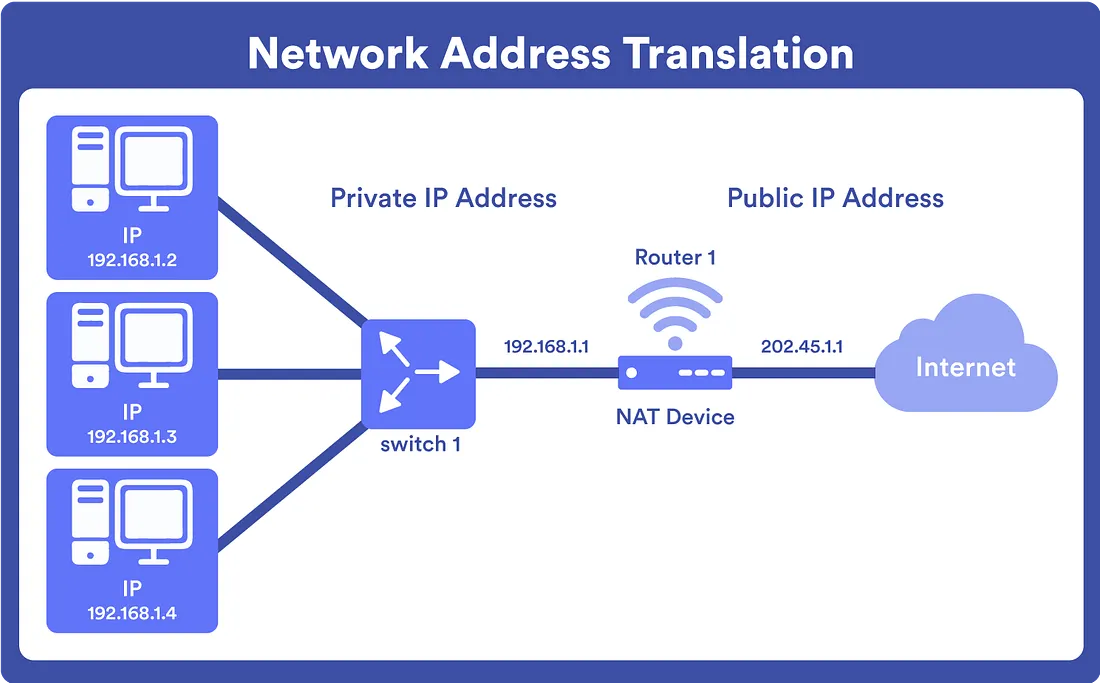
Public IP
- Given by ISP, unique worldwide.
- Used for communication on internet.
Private IP
- Used inside a local network.
- Not unique globally, cannot be accessed directly from internet.
Why Both?
- Private IP → Local communication inside LAN.
- Public IP → Connects to outside internet.
- NAT translates between them.
Example:
- Laptop → Private IP 192.168.1.5.
- Router → Public IP 122.178.44.11.
Web Development & Client–Server Model
Client–Server Model
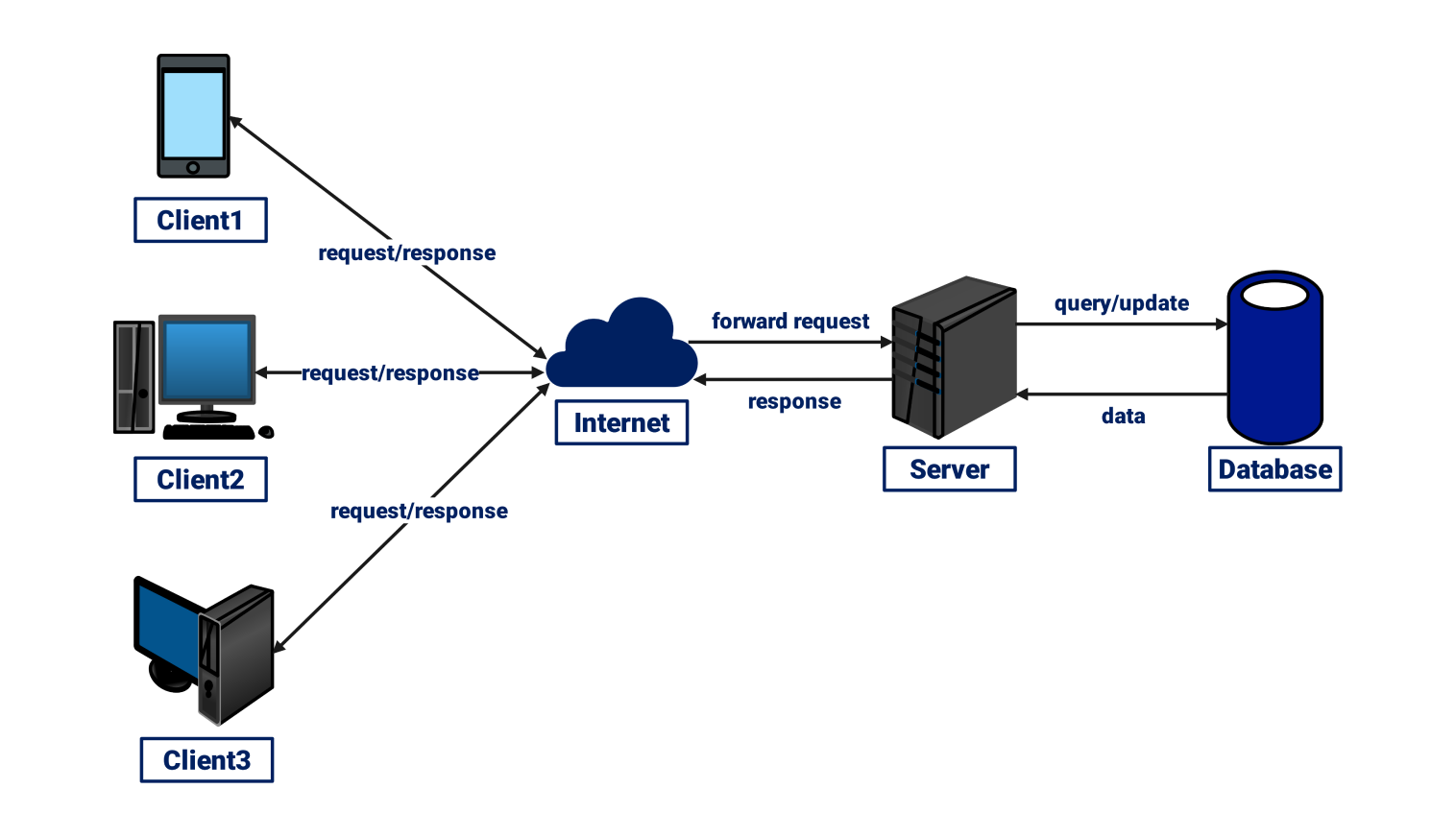
- Client: Browser/device sending request.
- Server: Stores data/websites & responds.
- Example: Google.com → Browser requests → Server responds.
Frontend (Client-side)
- HTML: Structures content.
- CSS: Styles content.
- JavaScript: Adds interactivity.
Backend (Server-side)
- Handles data, logic, databases.
- Examples: Node.js, Python, Java, PHP.
Flow:
- User → Browser (Client).
- Request sent to Server.
- Server processes & responds with HTML, CSS, JS.
- Browser displays page.